Build a PDF Report
Review, customize, and export a module report from a completed Evaluation.
PDF Reports are available for completed Evaluations that produced a Robustness, Fairness, or Explainability report artifact. Report export also requires the corresponding active License entitlement.
Open the builder
Open a completed Evaluation, choose Export, then Build Robustness report for this tutorial. Choose the corresponding report action for another available module.
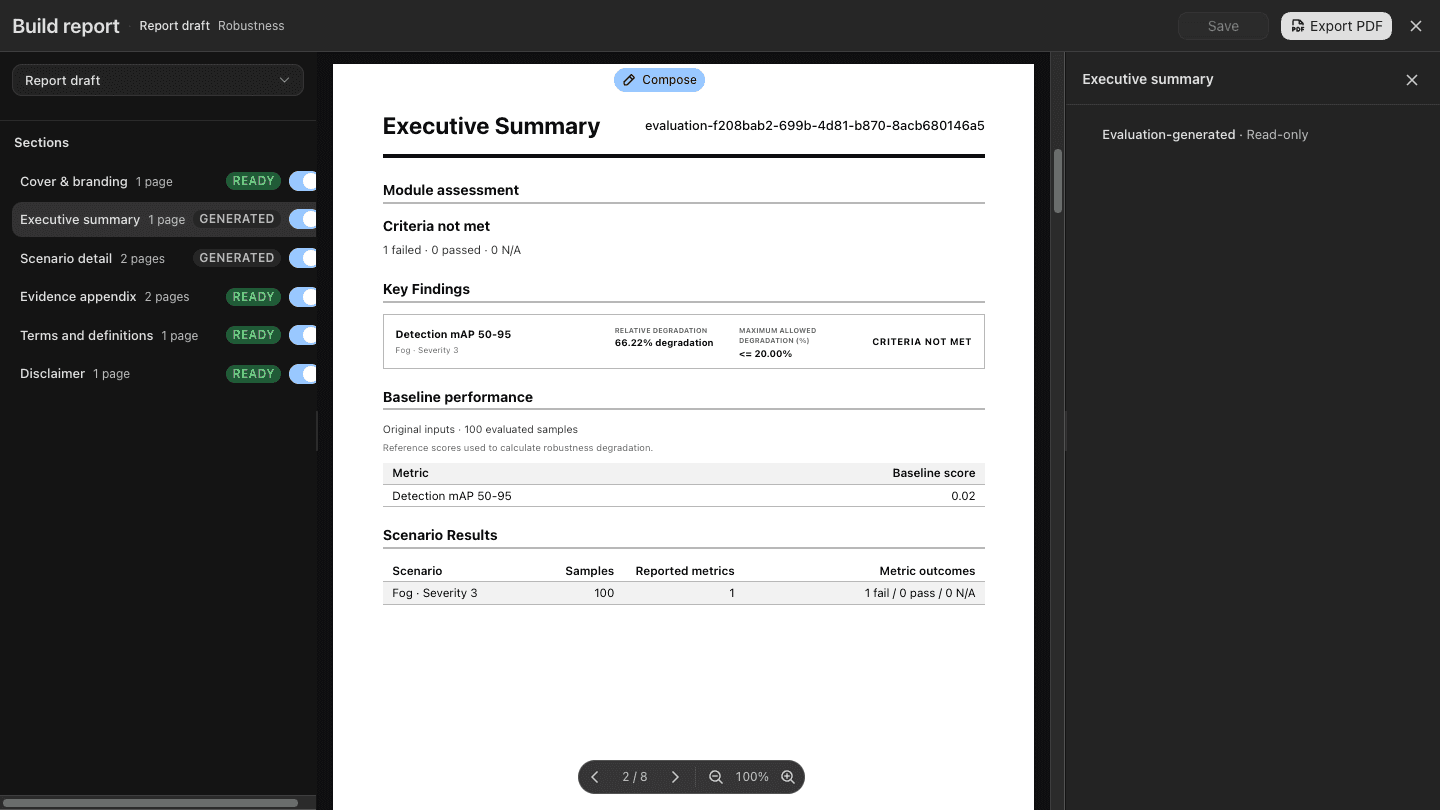
The builder contains a section outline and a live preview. The outline controls what is included; select a section to review its available editing controls. The preview represents the same draft that will be exported.
Review before export
- Select every enabled outline section.
- Confirm the report title, issue date, branding, and disclaimer.
- Review metric values, decisions, sample counts, methods, and exact settings.
- Add only relevant available Evidence images.
- Resolve validation errors and preview warnings.
- Save the draft.
- Choose Export PDF, save it, and open the exported file independently.
In the captured version, open Export > Build Robustness report, review the section outline and preview, then choose Export PDF.
The report draft is mutable presentation configuration. The exported PDF and draft do not modify the immutable Claim or Evidence they reference.